Mar. 23, 2026
Making React ProseMirror really, really fast
by Shane Friedman
React ProseMirror is, in many ways, a very boring project. It integrates React with ProseMirror. The actual resulting surface area of the library is quite small, because the premise is that it simply allows you to use React as you normally would and ProseMirror as you normally would, without having to worry about all the jank that normally results from such an integration.
If you’ve read the article I linked above, though, you know that it turns out to
be surprisingly challenging to do this correctly. So challenging, actually, that
the “right” solution turns out to be to reimplement prosemirror-view’s
rendering engine entirely in React. Ignoring the “draw the rest of the owl”-ness
of this approach, it does solve the original problem statement quite well. If
React is responsible for both state management and rendering, you can no
longer run into state tearing issues.
It does, however, introduce a new problem: How do you make it fast? And I mean, like, really fast. If your user is using a 60Hz display, your application has 16 milliseconds to produce the next rendered state before the display updates. If you miss the mark, the user might be waiting up to 32 milliseconds before they see a response to their input, which starts to creep into the territory of noticeable lag.
Initially I thought this wasn’t much of a concern. Dskrpt users are writing entire legal textbook chapters with React ProseMirror, and none have complained of lag. And they’re writing in German, I might add — not exactly a language known for its terseness!
But while working with the Moment folks on their local-first markdown editor, they insisted that React ProseMirror’s performance wasn’t good enough. As proof, they sent me a document with the entirety of the second Harry Potter novel pasted in. I tried to scoff (I really did!), but they followed up with a pretty solid use case: What if someone tries to write a W3C spec in Moment? Can we really say “sorry, our local-first markdown editor can’t handle your file, it’s too big?”
No. We can’t say that. So instead, we had to make React ProseMirror much, much faster.
A baseline: unmemoized React ProseMirror
To get a sense of the scope of this issue, let’s start out with an editor powered by React ProseMirror from before we embarked on this journey.
Try typing in the editor below. It’s using
@nytimes/react-prosemirror@0.7.0-next.10, the last release candidate before we
started working on performance.
Note: This is a very old version of React ProseMirror. It may have some other bugs, in addition to the performance issues I’m trying to highlight. Apologies if this doesn’t work well for you, especially on some Android devices!
Herman Melville’s Moby-Dick; or, The Whale is my go-to source for arbitrary text. This is a practice that I inherited from the Oak team at The New York Times and have simply never questioned.
It’s, uh, a little laggy. I’m honestly a little surprised that it works as well as it does — Moby Dick is a long book! But it’s also definitely not usable as a text editor. A single keypress can take 177 milliseconds, and the React Profiler makes it pretty clear why:
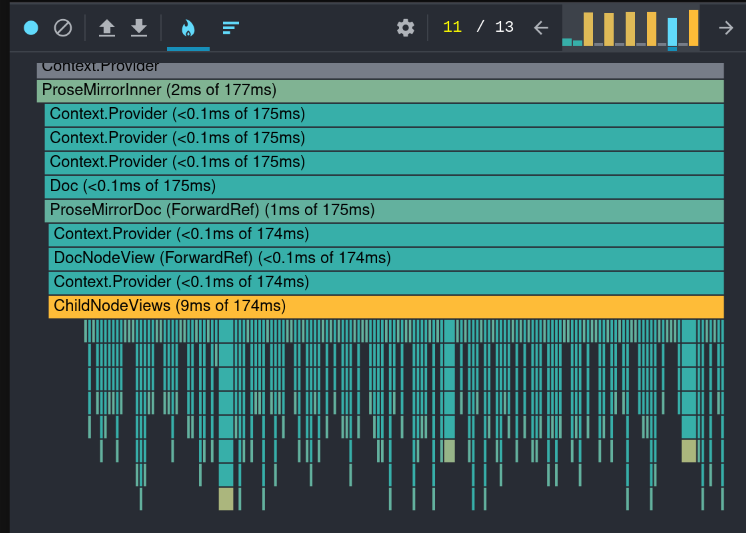
Another note: I didn’t really think about this at the time, but in order to use the React profiler, I had to run these tests in development mode. React is much faster in production mode, so while there’s still some lagginess on the version of this blog post that you’re reading, my initial reaction was based on a much less usable editor!
That’s a lot of re-rendering! For the most part, each NodeView component takes a millisecond or less to re-render, but there are 2560 paragraphs in this document, which nets us 5124 total nodes (including text nodes and the occasional blockquote) to render on each key press. Each node is wrapped in two or three actual React elements, too, which means we're rendering something like 15,000 React elements per key press. I am actually now more impressed that this works as well as it does — React really is quite fast, all things considered.
But not anywhere near fast enough, in this case! We have some work to do.
Doing some work
We need to memoize our components. Like, all of them. Luckily we don’t actually have that many. The first step looks the same across the board:
Though if we want that memoization to actually do anything, we need to make
sure that none of the props are changing unnecessarily as well. Right off the
bat, we’re going to run into issues with that pos prop. The pos prop is the
ProseMirror position at the start of this NodeView’s node. ProseMirror models
positions as integers, and characters of text, leaf nodes, and the borders of
non-leaf nodes all increment the position by 1.
That means that each time a user types a new character (or deletes one), every
NodeView after that new character/deletion will have a new position. And that
means they’ll re-render, because React.memo still re-renders your component if
your props change. There’s not really a solution for this — we can’t pass pos
as a prop if we want to prevent re-rendering thousands of NodeView components on
each key press.
This is a simple document with a few paragraphs. Each paragraph has a number next to it representing its start position.
Try typing a few characters in it.
Notice how if you type in an early paragraph, the position of each paragraph after the one you’re typing in will update
Let’s get rid of it!
Doing the rest of the work
One of the balancing acts that React ProseMirror has to do is to expose the
right API that violates as few expectations as possible for both React and
ProseMirror users. In prosemirror-view, node view constructors are passed a
getPos function:
It just acts as a way for a node view constructor to access its node’s position
at any time. In React, this felt odd — your node view component is being
re-rendered any time the document changes, so (I thought) it should just get its
position as a prop. Hence, props.pos.
Now, however, we don’t want your node view component to be re-rendered any
time the document changes, so we can’t pass its node’s position as a prop. But
maybe we can pass getPos, instead?
Previously, the code for determining a node’s position lived in the
ChildNodeViews component, and it looked like this (roughly, I’m eliding some
of the more complicated bits):
So as a naïve first step, let’s try just replacing pos with a function,
getPos:
This works, but it’s actually worse than before — now we create a new getPos
function on every render, even if the node’s position hasn’t actually changed.
We could memoize it with useMemo, but then we’re back to our original problem,
with a value that updates every time we type in front of the node.
What we need is a stable function reference whose return value updates on render. We need a ref.
We need to introduce a new element here, because we need to introduce yet
another layer of memoization, and we can’t call useCallback in a hook.
But… we haven’t really solved this problem yet. We’re still producing a new
getPos function each time offset changes. This is better than before —
now, at least, if I type in the first paragraph, I don't need to re-render every
text node in every paragraph after the first. But I still need to re-render
every text node in the first paragraph, and every paragraph node after the
first. It’s not 15,000 renders, but it is still probably 6,000!
This problem is sort of fundamental, though. The getPos function relies on the
offset, it’s a dependency in the most straightforward sense of the word.
Offset isn’t a ref, so if its value changes, we need to create a new getPos
function to close over the new value. If we want to get around it… we might need
to cheat a little.
Cheating a little
React has a lot of rules, because React components are designed around functional programming paradigms, but JavaScript makes it very easy to mutate and reassign values. React components are designed around functional programming paradigms in large part to enable “Concurrent Mode”, a suite of features that allow React to, among other things, interrupt and abandon renders. The rules help keep Concurrent Mode safe.
One of these rules is that refs shouldn’t be modified during the render cycle (with one exception). This is because React could abandon a render after running the code that modifies the ref, leaving it in a modified state without having committed the rest of the render to the DOM. Here’s an extremely contrived example:
Here’s the flow:
- The user takes some action that causes
value(the prop) to change, say from 3 to 4 - React re-renders
<BadRefUpdateDemo />with the newvalue, updatingvalueRef.currentto 4 - React abandons the render because a higher-priority update comes in
- The user still sees “Save (3)” on the button and clicks it
- The value 4 is saved to the backend, because the ref had been updated with the value 4
As I said, this is somewhat contrived, but it gets the point across. Updating a ref during render is technically a side effect, and therefore it can introduce a kind of state tearing that can lead to a user interface that doesn’t match some of the underlying state.
However, we have a bit of leeway here because we have a lot of control over when
our getPos ref is updated and how it gets used. It’s already a bad idea to
access getPos during render, because React ProseMirror specifically will not
re-render a node view component when its position changes (that’s our goal!).
It’s safe to read a ref (even one that’s been written during render) in a
useEffect or useLayoutEffect callback, because those won’t run at all if the
render is abandoned.
The only point of concern is the situation in the example above — if getPos is
accessed in a callback function. Even here, though, we’re still likely safe. To
dispatch a transaction or inspect the DOM at a position (the only two use cases
that would really require accessing the node’s position), you have to make use
of
useEditorEventCallback,
which provides access to the EditorView. The EditorView’s internal state is kept
in sync during render as well, which means that any state related to the current
position that’s read from the EditorView in the callback will be in sync with
the getPos value.
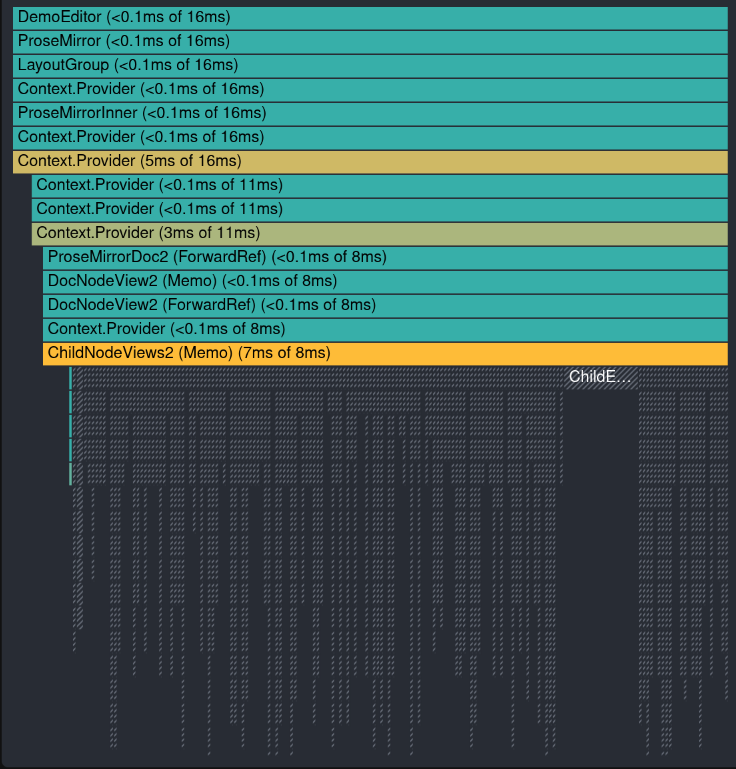
Is this perfect? I actually don’t think so, at least conceptually. Is it worth it? I think it is, even though React ProseMirror otherwise strives to follow the rules of React very strictly. This opens the door to perfect memoization, allowing us to only re-render exactly the text node (and its ancestors) that has actually changed after a change. It means rendering 6 elements instead of 15,000. And the costs seem minimal — it’s very unlikely that a user would be able to trigger an event callback between an abandoned render and its successful follow-up, especially because no one is updating React ProseMirror in an Action, because it has to update immediately while the user is interacting with it!
So now that I’ve reasoned myself into a state of cognitive consonance with my decision to cheat a little, let’s get back to it.
Doing the rest of the work, again
Before we get started, there’s one more important piece to this puzzle. React ProseMirror has a system for tracking ProseMirror nodes across changes called “the React keys plugin.” This turns out to not be totally trivial — ProseMirror nodes can only be uniquely identified by their position in a document, but obviously that position can change as transactions are dispatched. So the React keys plugin stores a map from position to unique key that it keeps up-to-date by mapping positions through transactions:
This is crucial for React ProseMirror to work — we need to be able to assign stable keys to each element in the tree so that React doesn’t incorrectly reassign our state or prematurely remount our elements.
It also turns out to be pretty useful for other things, like implementing
getPos.
It’s about to get a little weird.
Gross, right?
But, hear me out, it’s really fast:
Note: You may still run into a few issues if you’re on Android using a keyboard other than Gboard or the stock Android keyboard. Also, it seems like some Android devices (maybe due to memory constraints?) really struggle with editors with this much content, regardless of whether it’s optimized or even using React. Sorry if I crashed your browser!
Postscript: Bragging a bit
If you copy the text of Moby Dick from the editor above and paste it into the demo editor at prosemirror.net on Firefox, you’ll see something that honestly still shocks me a bit: it’s much slower than the React ProseMirror demo! This isn’t reproducible on Chrome, so I suspect it’s a performance issue with Firefox’s built-in contenteditable implementation. But I think this is sort of fascinating. React’s virtual DOM update algorithm is so fast that it actually beats a native implementation by a noticeable amount!
Postpostscript: Help us build Pitter Patter!
We’re building a new rich text editing framework, Pitter Patter! We think that we can build something really great, and we need your help. If you’re interested in sponsoring us, don’t hesitate to reach out!